WebSearch.
And why is it that every time a tab is disclosed another blurred one (2) appears?
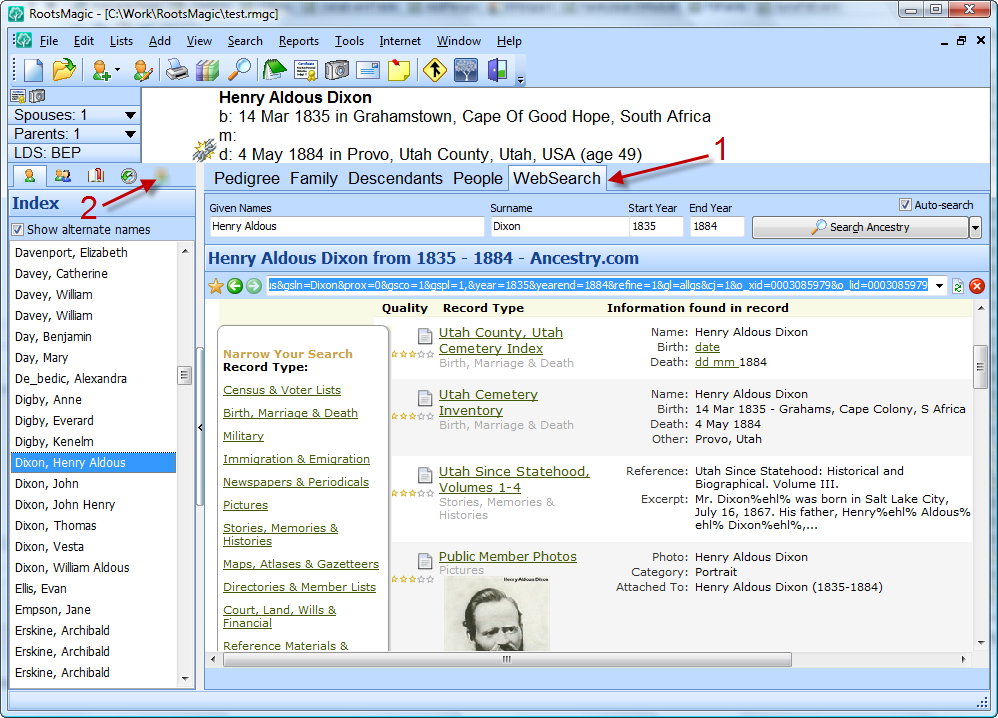
RootsMagic 4 makes it easier than ever to search online for information about your family. Just switch to the WebSearch tab and RootsMagic will do an online search for the currently selected person. And if you want to find someone else just click their name in the side list and RootsMagic will automatically search for them on the selected site.
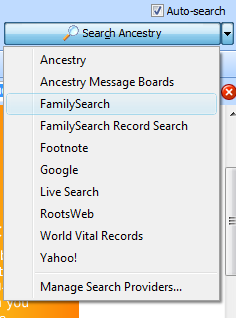
Of course nobody wants to search just one site, so RootsMagic lets you select which site you want it to use. Click the little drop arrow to the right of the search button and choose the site you want to search. If you want to add additional sites that we don’t include (or if you want to hide some of the built-in sites), choose “Manage Search Providers…”.
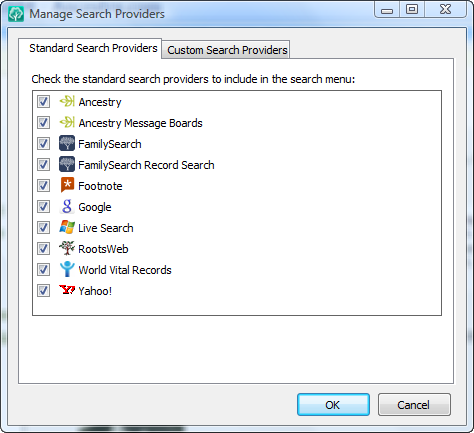
Here you can uncheck any sites you are boycotting or just don’t want appearing in the list. Or you can select the “Custom Search Providers” tab to add new search engines. I won’t go into gory details about adding a new search engine here, but it really is quite easy to do, even for a non-programmer.
Well, that’s one more new feature, with at least 10 more to go.
Oh, and I’m pretty sure that last new blurred tab above is the last one (for now). I think we figured out what keeps causing them to appear and got it taken care of <g>.
Excellent — another very useful feature that I look very forward to using!
One question I had was how much information from one’s database can automatically be sent to a particular website.
For example, Ancestry.com in its new ancestry search feature will accept a wide variety of data:
– Name
– First & Middle
– Last
– Birth
– Date
– Location
– Lived In (Residence)
– Location (1)
– Location (2)
– Location ( . . . )
– Death
– Date
– Location
– Family Members
– Father
– Mother
– Spouse
– Children
– Siblings
– Migration
– Arrival
– Date
– Location
– Departure
– Date
– Location
– Origin
– Location
– Destination
– Location
– Military Service
– Date
– Location
– Marriage
– Marriage Info
– Date
– Location
– Divorce Info
– Date
– Location
– More
– Keyword
– Gender
– Race/Nationality
– Other Info
– Date
– Location
– Publication Info
– Date
– Location
Will RM 4.0 be able to pass all the relevant data from one’s database to populate these fields or to allow some form of user-customization as to what will be sent?
This sort of feature would save an immense amount of time in terms of data entry, particularly when searching for a large number of people sequentially.
Eager to hear what’s next!
I LOVE IT – Yeassssssssssss!!! Especially programing in your own special sites to search – Will it take subscription info automatically?????
RM4 just gets better and better. Currently a PAF user, and cannot wait to make the transition. I can see all my ‘spare time’ (as if I have any anyway) just dissolving into the genealogical mist.Internet genealogy comes of age.
Thank you for another interesting and useful feature, building the excitement and expectation further – you tease!!
“Well, that’s one more new feature, with at least 10 more to go.”…
I estimate that with this blog being updated once a week or so (sometimes more often, true), there are at least ten weeks to go before RootsMagic 4 is released.
I’m putting my money on a release date of Monday 1 December 2008 – just in time for Christmas!
Yippee – but still hoping it’s a bit sooner!!
What I am wondering is will I ever get anything else done, once I get hold of RM4? It seems to have everything you could ever want from a family history program.
Val
Bruce,
With 10 or more features still to be revealed, will this be released in time for my birthday at the end of October, so I get myself a birthday present or will it be a Christmas present to myself instead?
Val
Will the search do more than just a name search like some other programs do, which is almost worthless for common names. I won’t name any names but the abbreviation is (AQ) only searches by name and I get like 10,000 hits which is worthless. For a search to be any good it needs at least a place and year unless the name is so uncommon than no one else has that name.
Another great feature Bruce, and I am glad that you said that the “last new blurred tab above is the last one (for now)” as all the guessing about the first one left me wishing for a to-do Tab which displayed outstanding items for the previously displayed family or generations.
Maybe in V5 eh! or maybe even in a wee patch for V4 (-:
Oh, the gap between the last two reveals was agonizing, please don’t leave it so long until the next one.
Congrats. You were just awarded the “I love your blog” badge at http://thechartchick.blogspot.com/2008/09/i-love-your-blog-award.html. Enjoy.
Janet
Bruce– You have received the “I love your blog” award from me at http://rzamor1.blogspot.com/2008/09/people-like-me-wahoo.html
Keep up the good work.
Renee
The RM4 sounds great for NFS support. I especially like the feature that you would know when someone changes information. This is an issue for some users right now.
I understand that roll out for Utah has been delayed until next year. Will RM4 still be out before end of 2008?
The Roots Magic program is great.
How do I merge data found from a web search to my Roots Magic files?
Thank you.
Meredith, currently you need to cut and paste it. This is an area we are looking into for a future update.